
Recently, we encountered a problem: our client has 2 Shopify stores and 1 Amazon account. After communicating with Shopify support and several apps providing Shopify and Amazon FBA integration, we realized that linking 2 Shopify stores and Amazon is practically impossible.
That's how we found the Sellbrite app, which supports multichannel connection.
The Sellbrite app is designed to synchronize your stores on the world's largest online marketplaces. It easily integrates with Amazon, eBay, Etsy, Walmart, Google, Sears, Newegg, Shopify, Shopify Plus, Bigcommerce, WooCommerce.
Sellbrite offers many features for your online store. Here are a few of them:
- Manage multiple stores and platforms from a single dashboard.
- Automatic synchronization of products, orders, and inventory across platforms to prevent overselling.
- Real-time inventory and order management.
- Sales and performance analytics.
- FBA order fulfillment from other sales channels.
Setting up the Sellbrite app
To set up the Sellbrite app, you need to install it from the Shopify app store and create an account. For your convenience, there is an installation guide on the app's main screen.

-
To add your sales channels, click Listings - Add/Manage Channels, after which you will be taken to a page displaying all your connected marketplaces. In the top right corner, there is a button “Connect a new Channel”, through which you can add a new sales channel.
Select the channel you want to connect, fill in the required fields, and log into the selected sales channel account in the new tab that opens after clicking the “Connect your Account” button.


-
After adding all the sales channels you need, you must add products from these channels. To do this, go to the desired channel via Listings and click the “Import From Shopify” button. Add products this way not only after adding a sales channel but also if you create new products separately in your channel. Repeat this for all your channels.

- Next, synchronization of your products across all sales channels will happen automatically if your product SKUs match. If SKUs do not match the correct products, you need to fix this in your sales channels and re-import the products. To check if your products synchronized correctly, go to All Products; on the right, you will see the logos of your channels whose products have synchronized. If some products did not synchronize, go to your channel page, click the synchronization icon that will be red, and select the appropriate product.

This completes the basic setup of your sales channels and products, and you can already work in this app. View orders, sales, available inventory, and sales analytics.
How to set up FBA order fulfillment from other sales channels?
To set up the FBA function for other sales channels, go to the settings of the desired channel, Listings - Shopify - Channel settings. Then make the following settings:
- Enable inventory synchronization.
- Set the FBA warehouse as the top priority among all warehouses.
- Map your Shopify and FBA warehouses.
- Enable automatic FBA fulfillment.

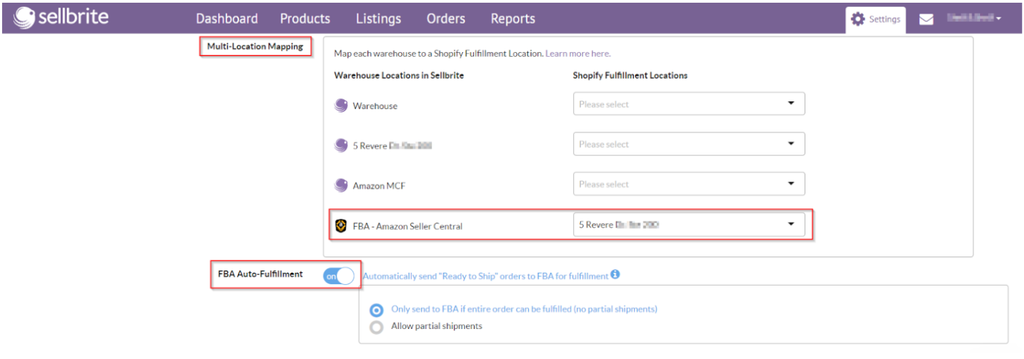
After you apply these settings, your orders will be sent automatically within 20 minutes after synchronization of orders from your sales channels. You can also send orders manually.
To send an order using the FBA function, go to Orders, select the order you want, open it by clicking the order number, and click the “Send to FBA” button.

Sellbrite Pricing
Sellbrite offers several pricing plans depending on your usage level and the number of platforms where you sell products. Currently, Sellbrite offers the following plans:
- Free plan: suitable for small stores that operate on only one platform and have fewer than 30 orders per month. The FBA integration is not available in the free plan.
- Paid plan: pricing depends on the number of orders per month and starts at $29 per month for 100 orders. You will also need to pay an additional $19 per month for FBA integration if you need this feature.


